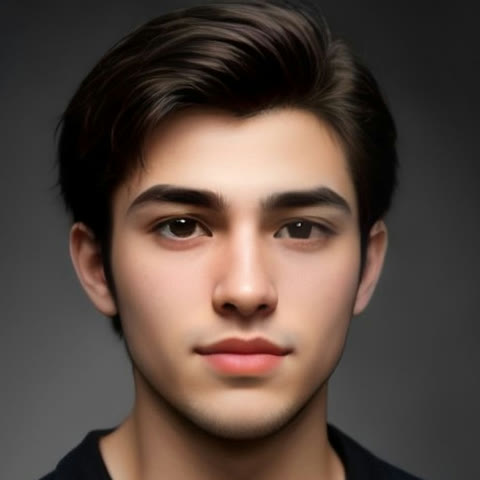
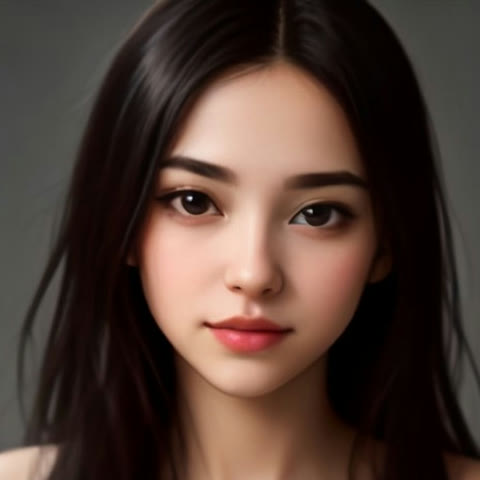
Upload one or two photos and the people in them rap: an original verse, an AI rap voice and a beat, lip-synced into a 12-second vertical video. Pick a template for the stage and the tone, add a name and an inside joke if you like, and the AI does the rest — no filming, no editing, no app to install. Lyric drafts are free, every verified account gets a free 6-second watermarked preview, and the full video costs $3.99 as a one-time purchase with no subscription.
How to make a photo rap
- Pick a template. Birthday Rap is already selected above. Diss Track, Roast Battle, Christmas Rap, Hype Duo, Grandma & Grandpa Rap and Pet Rap each come with their own stage, beat and lyric style.
- Upload your photo. One clear, front-facing photo of an adult who agreed to appear, or two for a duo. JPEG, PNG or WebP, up to 10 MB each.
- Add a topic (optional). Names, the occasion and one detail only your crew would get. Leave it empty and the template writes a general verse.
- Generate. The AI writes the bars, raps them over an original beat and animates the face so the mouth matches every word. Close the tab if you like; we email you when the video is ready.
Original photo → finished video
Every sample above shows the photo it was made from, right under the video. Both portraits are AI-generated adults, so nobody real is on screen. The same portrait became four different videos: a birthday party performance, a one-take diss track, a head-to-head roast battle and a Christmas verse in front of the tree. The photo is the only thing you bring. The template decides the stage, the beat and the attitude, and the topic decides what the lyrics say.
One photo or two?
- One photo, one rapper. Birthday Rap, Diss Track, Christmas Rap and Grandma & Grandpa Rap work with a single photo, and that person raps the whole verse.
- Two photos, two rappers. Hype Duo and Roast Battle need exactly two photos and put one face on each side. Birthday Rap, Diss Track, Christmas Rap and Grandma & Grandpa Rap also take a second photo, which puts both people on the stage side by side.
- A pet photo. Pet Rap takes one photo of a cat or a dog and gives it a first-person verse about naps, snacks and zoomies.
- No photo at all. The personalized Santa video has Santa built in, so you only type a name.
Make a photo sing with AI? Here it raps
Most AI singing video generators and talking-photo apps lip-sync a face to audio you bring, so the song still has to come from somewhere. This one writes the song too: original lyrics, an AI rap vocal and an original beat, performed by the face in your photo in one pass. It makes a photo rap, so the delivery is rhythmic bars and a shouted hook rather than a sung melody.
What it will not do is just as clear. It will not sing a famous song, a track you upload or a melody you hum, and the voice does not imitate any real artist. That keeps the video yours to post: a clip built on somebody else's recording can be muted or taken down, and an original one cannot. If you want every word to be yours, open "Write my own lyrics" — the video raps exactly what you type. The text to rap generator starts there.
Which photos work best
- One person per photo. A group shot gives the model several faces to choose from, and it may pick the wrong one. For two people, upload two photos.
- Front-facing, eyes open. A head turned far to the side or tipped back loses the face halfway through the clip.
- Even light, no sunglasses. Hard shadow across half a face, a hat pulled low and heavy filters all cost you detail.
- Frame from the chest up. A full-body photo taken across a room leaves too few pixels in the face to rebuild.
- Adults who agreed to appear. No photos of minors, and no faces you do not have permission to use.
What it costs
Lyric drafts are free within guest limits and need no account. Credits go on the video only: each verified-email account gets one play-only, 6-second 480p watermarked preview. A downloadable 12-second 480p video is 30 credits and 720p is 60. Credit packs are one-time, with no subscription: $3.99 for 30 credits, which is exactly one 480p video, then $9.99 for 100, $29.99 for 350 and $79.99 for 1,000. Credits do not expire, and a failed render gives them back automatically.
Want a specific occasion? The diss track maker is built for roasting one target, the Christmas rap generator for the holidays, and the AI rap generator writes the lyrics first if you would rather read them before you upload anything. Or start from the AI rap video generator home page.
Frequently asked questions
How do I make an AI rap video from a photo?
Pick a template, upload one or two clear photos of adults who agreed to appear, add a topic if you like, and press "Generate video". The AI writes original bars, performs them with an AI rap voice over an original beat and animates the face in your photo so the lips match the words. You get a 12-second vertical MP4, usually in one to two minutes.
Do I need one photo or two?
One photo is enough for Birthday Rap, Diss Track, Christmas Rap and Grandma & Grandpa Rap, and that person raps the whole verse. Those templates also take a second photo. Hype Duo and Roast Battle need exactly two, one face per side. Pet Rap takes one photo of a cat or a dog.
Can AI make my photo sing a real song?
No. This tool makes a photo rap, not sing a song that already exists. Every verse is written new and performed over an original AI beat chosen by the template. You cannot upload a song or a recording, and the voice does not imitate any real singer. If you need a face lip-synced to an audio file you already have, a talking-photo app is the right tool.
Can I use my own lyrics?
Yes. Open "Write my own lyrics", draft a verse for free or type your own, and the video raps exactly those words over the template’s beat. It raps them; it does not sing a melody you have in your head.
Can I make my dog or cat rap?
Yes. Pick the Pet Rap template and upload one photo of your cat or dog. The pet raps a first-person verse about naps, snacks and running the house on a tiny living-room stage. Put the pet’s name in the topic and the lyrics use it.
Can I use a photo of a child or a celebrity?
No. Photos of minors are not allowed on this site, for any template. Only use photos of adults who agreed to appear, and never a face you do not have permission to use.
How much does a photo rap video cost?
One 12-second 480p video is 30 credits and 720p is 60. The $3.99 pack is exactly 30 credits, which is one 480p video; larger packs are $9.99 for 100 credits, $29.99 for 350 and $79.99 for 1,000, all one-time with no subscription. Each verified-email account also gets one free 6-second watermarked preview, and a failed render returns your credits automatically.
Is the downloaded video watermarked?
Paid videos download as a 9:16 MP4 with no watermark, ready for TikTok, Instagram Reels, YouTube Shorts or a group chat. Only the free 6-second preview carries a watermark, and it plays on the site only.
What happens to my photos?
Uploaded photos and the generated audio and video stay in your project in our own cloud storage, readable only through your account. Delete the project and its photos, audio and videos are removed from our storage right away.
Last updated: 2026-11-03